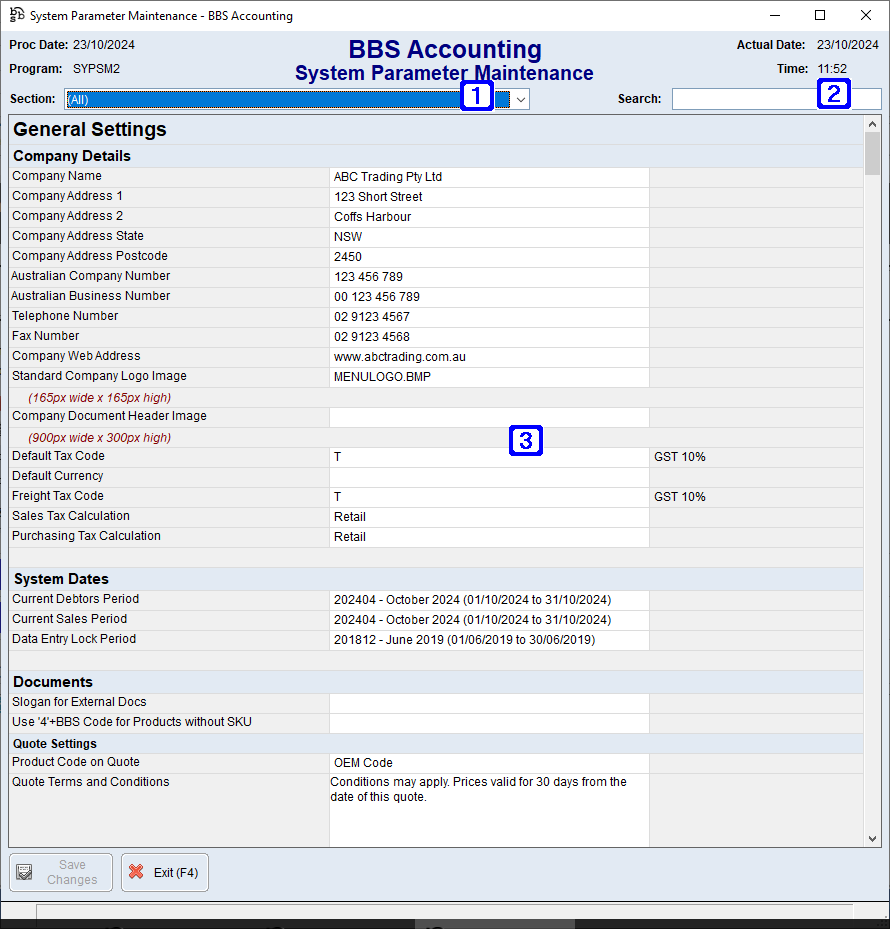
•Slogan for External Docs - Slogan to appear on the bottom of all external documents. (eg. A one liner slogan for your business).
•Use '4'+BBS Code for Products without SKUs -
oYes to display products without SKUs with a '4'+BBS code as the product code (only relevant if SKU has been selected above).
oNo or leave blank to not display products without SKUs with a '4'+BBS code as the product code.
•Use Sales Rep Department on Transactions for Branding -
oYes - Sales Rep Code department will be used to determine document Branding. (Blank = Yes)
oNo - Customer Account Manager Rep Code department will be used to determine document Branding.
Quote Settings:
•Product Code on Quote - The product code to display on quotes.
oNo Product Code = No product code will be displayed.
oBBS Code = BBS code will be displayed.
o SKU/EzCode/OC Item = SKU will be displayed.
oOEM Code = Manufacturers part no will be displayed).
•Quote Terms and Conditions - Quote terms and conditions text.
Price Comparison Settings:
•Price Comp T&Cs - Price Comparison terms and conditions text.
Customer Order Form Settings:
•Cust Order Form T&Cs - Customer Order Form terms and conditions text.
Statement Settings:
•Show On Account on Statements -
oYes - to display 'On Account' amounts on Statements.
oNo or leave blank not to display 'On Account' amounts on Statements.
•Show A/R Journals on Statements -
oYes - to display debtors journals on Statements.
oNo or leave blank not to display debtors journals on Statements.
•Show EFT Details for bank - The bank code to display EFT details on statements for.
•Remittance Format -
oCheque/EFT Remittance - Cheque and EFT details will be displayed on the remittance.
oEFT Remittance Only - EFT details will be displayed on the remittance.
oEFT and Online Payments - EFT and Online Payment details will be displayed on the remittance. Note: To use Online Payments, your system must be configured for our Secure Online Payment Platform.
oEFT, Online Payments and Phone Payments - EFT, Online Payment and Phone payment details will be displayed on the remittance. Note: To use Online Payments, your system must be configured for our Secure Online Payment Platform.
Invoice Settings:
•Show Product Code on Invoice - The product code to display on invoices.
oNo Product Code = No product code will be displayed.
oBBS Code = BBS code will be displayed.
oSKU/EzCode/OC Item = SKU will be displayed.
oOEM Code= Manufacturers part no will be displayed.
•Show Invoice Terms and Conditions - Invoice terms and conditions text.
•Show Static Message - Static message text to appear on invoices.
•Show EFT Details for Bank - The bank code to display EFT details on invoices for.
•Show Rep Name -
oYes to display rep name on invoices.
oNo or leave blank to not display rep name on invoices.
•Show Web Order Box -
oYes to display web order.
oNo or leave blank to not display web order box on invoices.
•Show Total Wgt -
oYes to display total weight of products.
oNo or leave blank to not display total weight of products on invoice.
•Show Warehouse Address on Remittances -
oYes to use warehouse address on invoice remittance slip.
oNo or leave blank to use company address on invoice remittance slip.
•Indent Address for Window Face Envelopes -
oYes to indent the address on invoices to suit window faced envelopes.
oNo or leave blank to not indent the address on invoices to suit window faced envelopes.
•Inv Format -
oGST Exclusive leave blank to display prices on invoices as exclusive of GST.
oGST Inclusive to display prices on invoices as inclusive of GST.
•Email Address for Remittance Advices - Email address to display on invoice remittance slip.
•Remittance Format -
oCheque/EFT Remittance - Cheque and EFT details will be displayed on the remittance.
oEFT Remittance Only - EFT details will be displayed on the remittance.
oEFT and Online Payments - EFT and Online Payment details will be displayed on the remittance. Note: To use Online Payments, your system must be configured for our Secure Online Payment Platform.
oEFT, Online Payments and Phone Payments - EFT, Online Payment and Phone payment details will be displayed on the remittance. Note: To use Online Payments, your system must be configured for our Secure Online Payment Platform.
Delivery Docket Settings:
•Show Product Code on Del Dkt - The product code to display on delivery dockets.
oNo Product Code = No product code will be displayed.
oBBS Code = BBS code will be displayed.
oSKU/EzCode/OC Item = SKU will be displayed.
oOEM Code = Manufacturers part no will be displayed.
•Show Weight -
oYes to display total weight of products.
oNo or leave blank to not display total weight of products on delivery docket.
•Del Docket Terms and Conditions - Delivery docket terms and conditions text.
|



 to search. If left blank, manual entry will be required.